01 · Missed-call recovery
Turn missed calls into conversations.
Respond quickly when the front desk cannot pick up, then keep the lead moving.
Missed call detectedText-back sent immediatelyBooking link + reminder
Turn scattered marketing tools into one reliable operating system that moves a prospective patient from first touch to booked consult, follow-up, and measurable next step.
The install promise is simple: every lead gets captured, routed, followed up, and measured inside one operating system so the practice can see which path is working and where the leak is.
Website pages, ads, calls, referrals, and direct messages all land in one intake path with source, consent, and owner attached.
Each inquiry is routed by intent, urgency, service line, and readiness so the right person handles the next conversation.
Immediate confirmation, missed-call text-back, and team notifications keep the lead warm while the next step is booked or qualified.
Calendar routing, follow-up reminders, paywall access, and checkout links move the right person into the right offer without manual chasing.
Reporting ties each inquiry to its source, offer, payment, and next action so the team can see what produced the result instead of guessing.
Review requests, reactivation, and performance checks turn the install into an operating rhythm instead of a one-time setup.
Whether a practice starts with a marketing question, a clinical growth question, or both, the install creates one clear path from inquiry to qualified conversation and measurable follow-up.
Respond quickly when the front desk cannot pick up, then keep the lead moving.
Give every booked consult the right reminders and an easy reschedule path.
Keep unready inquiries warm with relevant education and a clear next step.
Invite feedback after the right moment and route issues before they become reviews.
Illustrative workflow. Message timing, channels, and consent gates depend on the approved plan and practice configuration.
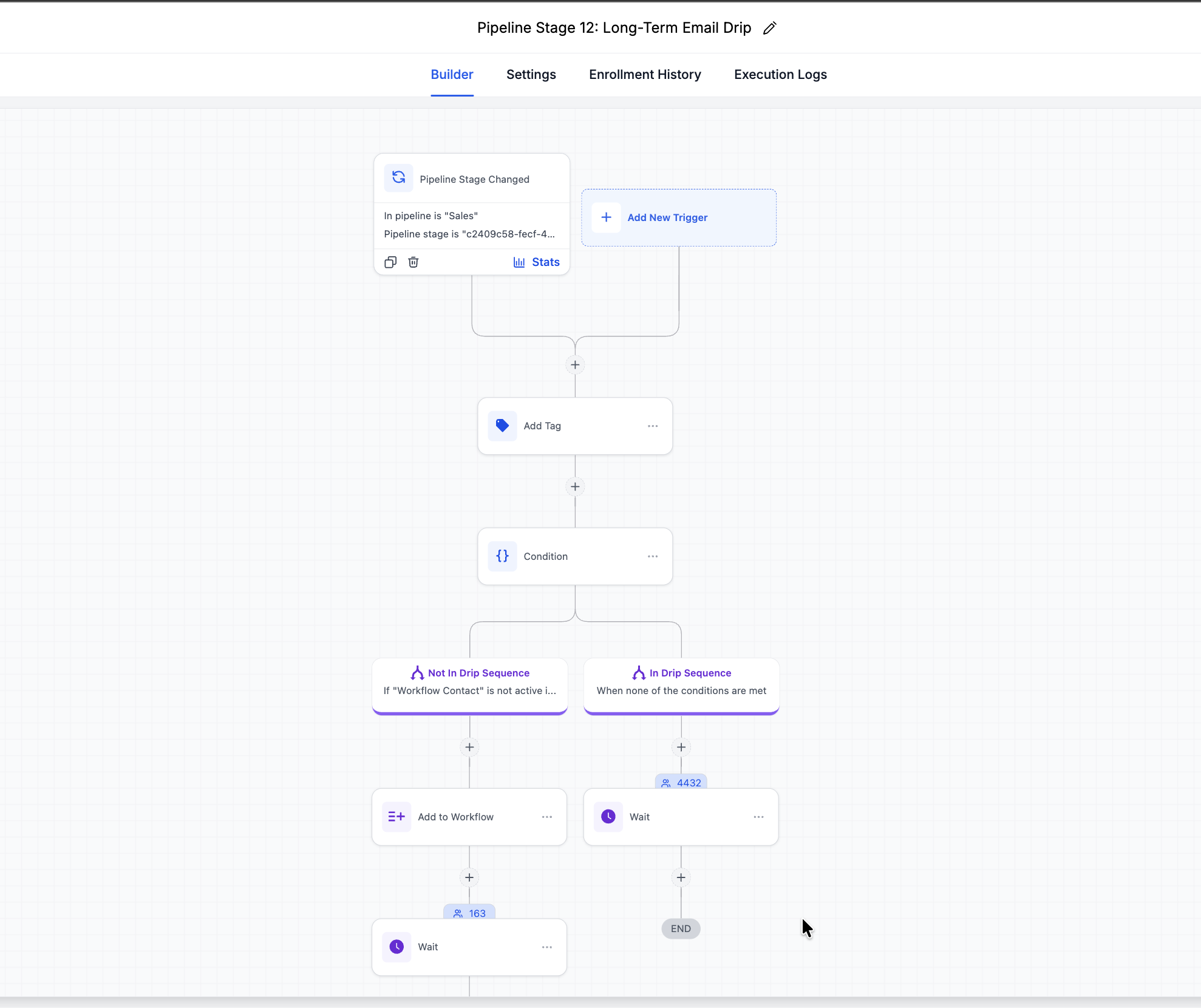
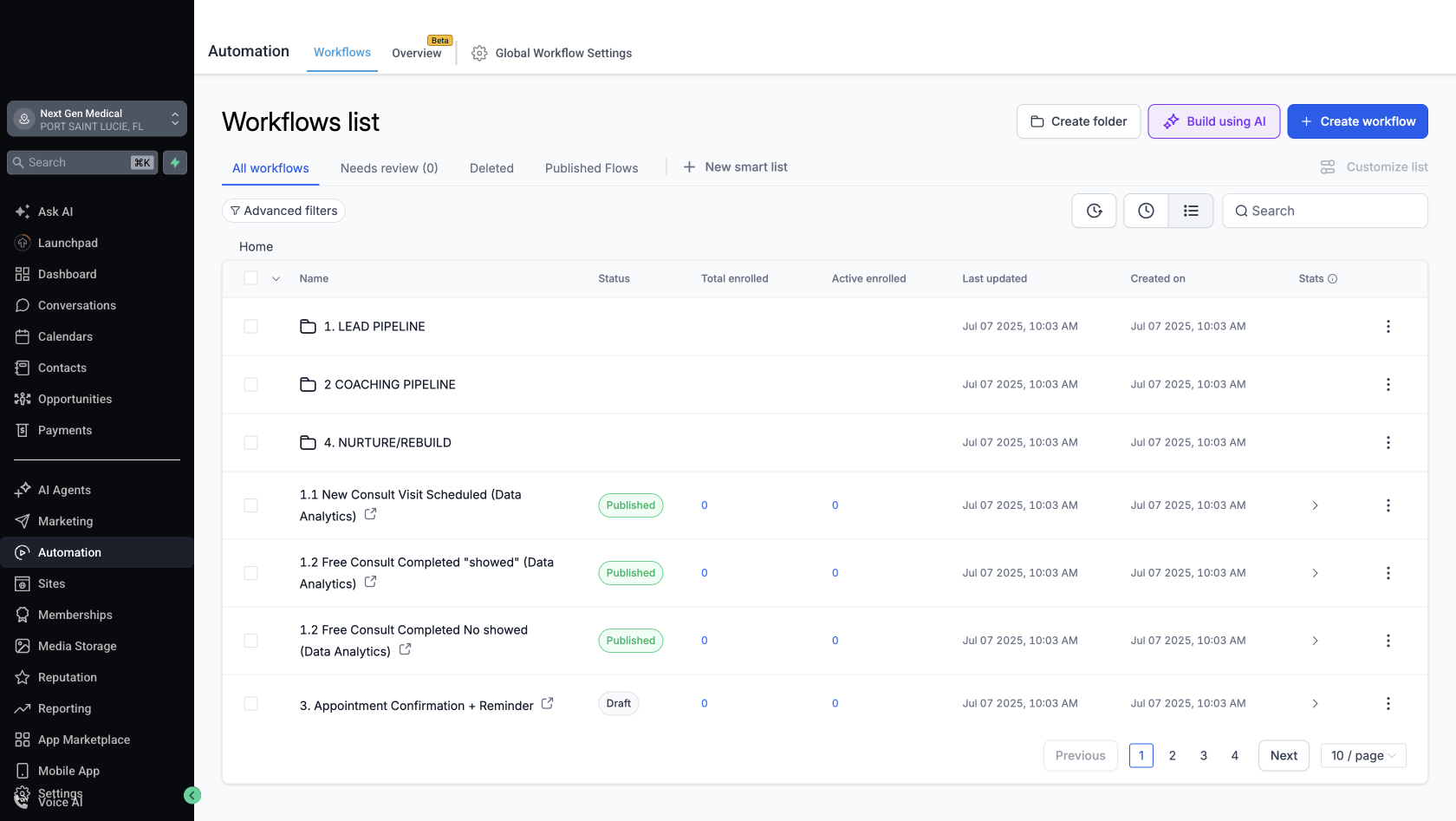
Everything above runs inside a real GoHighLevel build — the same one we operate ourselves. Below is the automation canvas: a live branching sequence with conditions, waits, and enrollment counts on each path. This is what gets installed in your practice, configured to your service lines.
At a glance, your team can see where an inquiry came from, what happens next, and which actions are producing progress.
Illustrative dashboard view. Your install is configured around the channels, services, and conversion goals that matter to your practice.
The install makes every inquiry easier to manage. The route is decided by intent, then logged in the system so your team always knows the next action.
Next action: confirm the route, assign the owner, and record the next step in GoHighLevel (GHL). Open contact
The practice has a clear need, but the outcome requires more than one specialty. Route the follow-up as a coordinated plan.
Example alerts. Channels, wording, and routing are configured to the practice, the approved content, and the team structure.
The circle visual shows how the install is organized: outer layers move traffic in, middle layers convert and route, and the inner layer holds approval, acceptance, and reporting.
Use the outer layers to drive entry, the middle layers to convert and route, and the inner layer to verify that the right thing happened after the purchase or inquiry.
The implementation team owns the website, GoHighLevel (GHL), ads, content, tracking, and automation. A clinical reviewer validates medical copy, training, and offer fit before launch.
Every deliverable has a clear owner, review step, and handoff so your team can run the system confidently.
Each stage opens only after the prior one is tested, documented, and ready for your team to use.
Confirm your goals, service lines, systems, and success measures. We scope the build around what should improve first.
This is the guardrail step: align the build before implementation begins.
Set up the resources upload area, product catalog, course paywalls, order tracking, and the GoHighLevel (GHL) lifecycle. Verify checkout, entitlement, refund, and follow-up readbacks in test mode before anything is exposed.
No live charge, no public send, no unlocked course until the test passes.
Open campaigns and referral traffic only after the install, checkout, and routing checks pass. The system scales after the first pass is cleanly tested.
Traffic opens only when access, routing, and payment all read back correctly.
Measure access, activation, support load, and the conversion path. Tighten the free-to-paid boundary, expand the content library, and use the first cohort to decide which upgrade path deserves more volume.
Scale only after the first cohort proves the route is clear and worth repeating.
These are scoped during the strategy call and only attached when the practice needs them. The list stays centered on the install: assets, catalog, paywalls, routing, and readback.
Every install is built around visible work, documented decisions, and an acceptance check before the next phase opens.
Sources, conversations, next actions, and ownership stay together so your team can see what happened.
Pages, routing, automations, and access changes are reviewed with you before anything is exposed.
We document the operating rhythm and train the people responsible for the next step.
Six questions, about ninety seconds. We map where your inquiries actually come from, what happens to them after hours, and where the follow-up is leaking — then send you the findings in writing.
No call required to get the audit. If you want to walk through it live, there’s a link in the email.
Review, strategy call, build. Phase 01 starts inside the first week.
Tell us where your practice is losing momentum. We will map the right install path and confirm scope together.
Sixty minutes to clarify your goals, service lines, current systems, and the first improvement to install. Strategy call calendar →
Website, pipeline, automations, and phone routing go in. Your database is imported and segmented. Your team is trained. By day 30, Phase 01 is ready for acceptance.
Medical and regenerative practices that need a more dependable path from inquiry to booked conversation, follow-up, and reporting.
We review your goals, service lines, current tools, lead path, and team capacity, then recommend the smallest useful scope.
Scope and payment structure are confirmed after the strategy call based on the systems, channels, and team support your practice actually needs.
No. Media budgets remain in your advertising accounts and are paid directly to the platforms. We can configure and optimize the approved campaigns.
A point person, access to the systems in scope, approved brand and service information, and timely review of acceptance checkpoints.
Start with a scope review, then book a strategy call. The build starts after scope and timing are confirmed.